[Avalonia] Button의 Style (Hover, Pressed)
by #독개#
<Window xmlns="https://github.com/avaloniaui"
        xmlns:x="http://schemas.microsoft.com/winfx/2006/xaml"
        xmlns:d="http://schemas.microsoft.com/expression/blend/2008"
        xmlns:mc="http://schemas.openxmlformats.org/markup-compatibility/2006"
        mc:Ignorable="d" d:DesignWidth="400" d:DesignHeight="450"
        Width="400"
        Height="450"
        x:Class="AvaloniaApplication11.MainWindow"
        Title="AvaloniaApplication11">
   <StackPanel>
       <Grid ColumnDefinitions="Auto, *" Background="Orange" Height="40">
           <Rectangle Grid.Column="0" Fill="Red" Width="40"></Rectangle>
           <Grid Grid.Column="1" Background="blue">
               <Grid.Styles>
                   <Style Selector="Button:pointerover /template/ContentPresenter">
                       <Setter Property="Background" Value="orange"></Setter>
                   </Style>

                   <Style Selector="Button:pressed /template/ContentPresenter">
                       <Setter Property="Background" Value="White"/>
                   </Style>
               </Grid.Styles>
               <!-- 이렇게 그리드스타일을 지정하고나면 이아래에 Button들은 모두 이설정을 따른다 이걸윈도우에 지정하면 윈도우모두겠지 -->
               <!-- button에 클래스값을 넣어서 특정 클래스만 설정도 가능하다 이건 레퍼런스의 style을 참고하자 -->
               <Button Content="자동사이즈버튼" Foreground="white" FontWeight="UltraBold" Background="black" VerticalAlignment="Center" HorizontalAlignment="Center"></Button>
               <Button Content="Test" Background="black" Foreground="white"></Button>
           </Grid>
       </Grid>
   </StackPanel>
</Window>
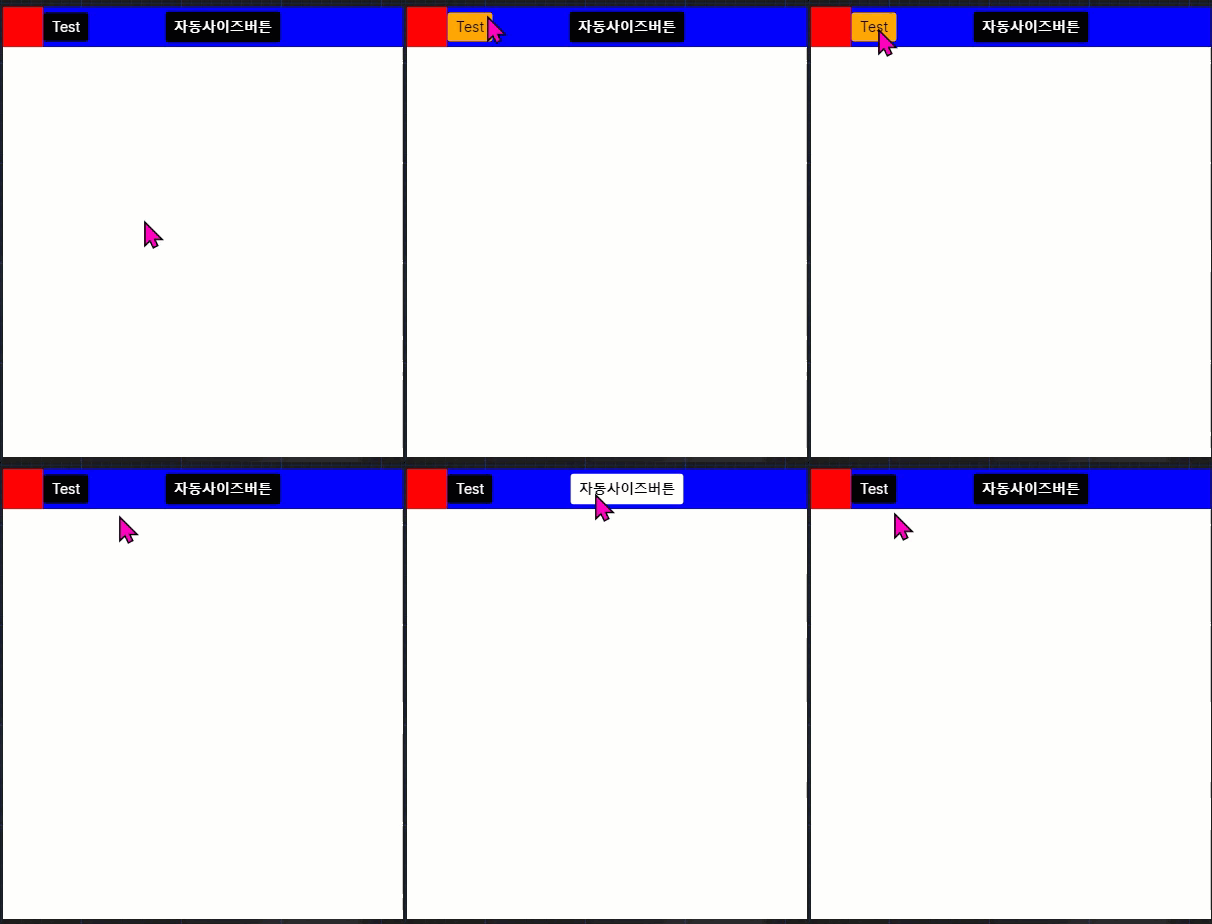
참고
https://www.youtube.com/watch?v=VM-4NwdeXlo&t=54s
'🏹 프로그래밍 활용 > Avalonia' 카테고리의 다른 글
| [Avalonia] window창 드래그로 이동하기 (0) | 2022.12.16 |
|---|---|
| [Avalonia] window 창 투명하게하기 (0) | 2022.12.16 |
| [Avalonia] Fluent Theme (0) | 2022.12.16 |
| [Avalonia] Theme Plugin (0) | 2022.12.16 |
| [Avalonia] 설치 방법 및 레퍼런스 (0) | 2022.12.16 |
블로그의 정보
독한 개발자
#독개#